
A teammate sends you a polished risk summary or vendor comparison, and it reads well. You ask one question about how they reached the main conclusion, and the answer is a pause followed by "let me check what the AI said."
That pause is the problem Gartner has started warning CIOs about. Of the 533 CIOs and senior IT leaders Gartner surveyed in late 2025, MarketScale reports, just 40% had any plan to protect their staff's skills and judgment as AI use grows. The full Gartner report sits behind its client login and MarketScale took the figure from another outlet, so treat it as secondhand. Gartner's own public research points the same way: a June 2026 report summary describes judgment, creativity and critical thinking wearing away as a side effect of AI that nobody chose. For a project manager the risk is concrete. Your plans, estimates and status calls depend on people who notice when a number is wrong. Here are four beliefs that let the problem grow, what the evidence says about each, and what to do instead.
Myth: If the work looks right, the person who sent it understands it
A Microsoft Research study presented at CHI 2025 asked 319 knowledge workers about 936 real tasks where they had used generative AI. The more someone trusted the tool, the less critical thinking they reported putting into the task. People who felt sure of their own ability to judge the output did more of it. The researchers also saw effort move away from doing the work and toward checking AI answers and fitting them together. The data is self-reported and shows a link rather than a cause, but the direction matches what many managers see.
A clean draft tells you the tool was capable. It tells you very little about whether the sender would spot the one wrong assumption buried in paragraph three.
What to do instead:
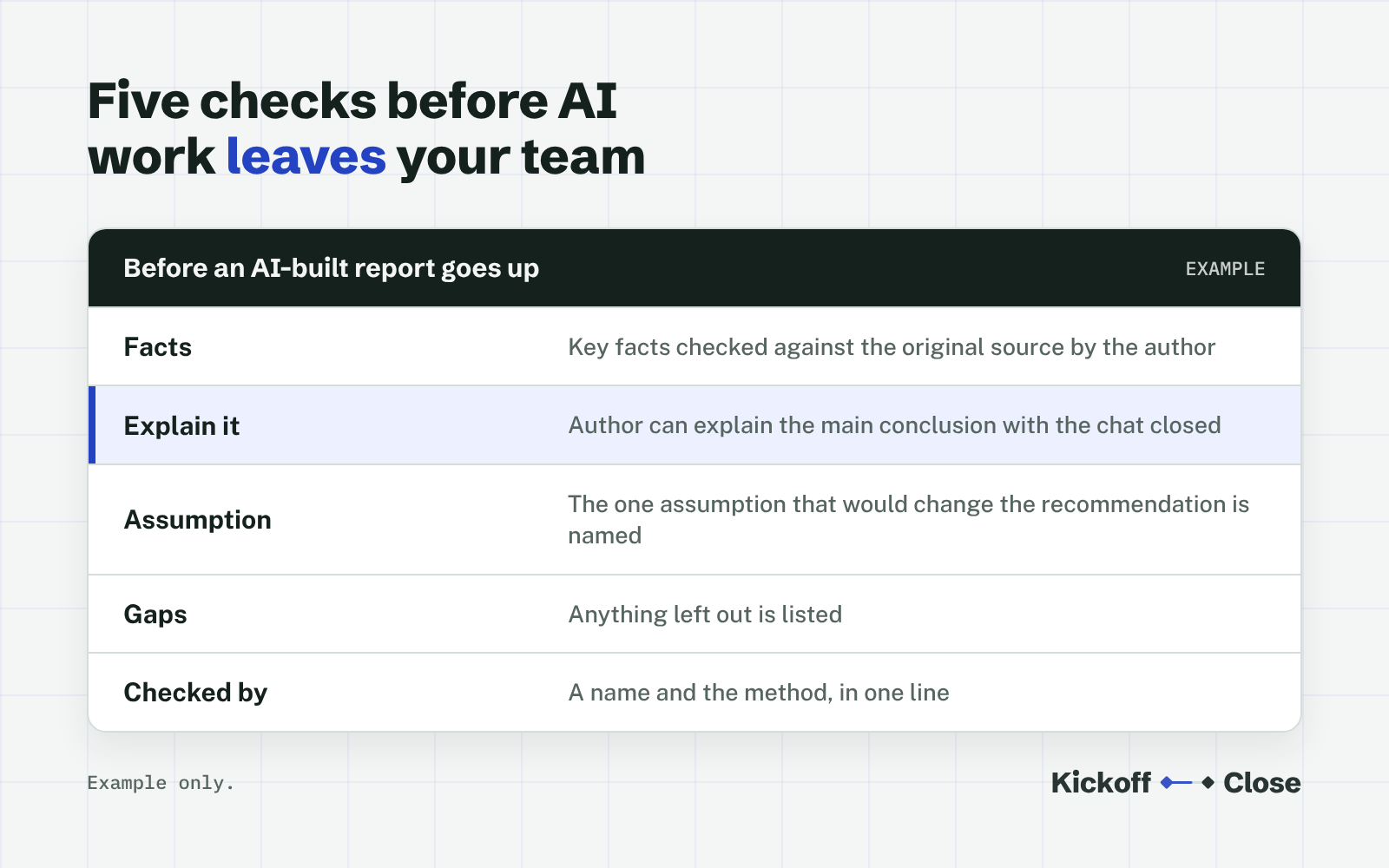
Ask one follow-up question on anything AI-assisted that goes to a sponsor or client: why this number, what would change the recommendation, what got left out. The author should be able to answer without reopening the chat.
Have the author confirm the two or three facts the decision rests on against the original source, in person, before the work leaves the team. According to MarketScale's summary, Gartner recommends exactly this kind of personal check for important AI-built reports before a manager sees them.
Add a line to your report template called "Checked by, and how." A name and one sentence ("budget figures matched to the finance export on Tuesday") makes the check visible and hard to skip.
Myth: The time saved makes up for the practice lost
In January 2026 Anthropic published a randomized trial with 52 mostly junior software engineers learning an unfamiliar Python library. On a quiz taken afterward, people who had coded by hand scored 67% on average; people who had the assistant scored 50%. Debugging questions showed the biggest difference of all. Speed barely moved: the assistant saved roughly two minutes, a gap too small to count as statistically meaningful.

It is one small study, about coding, measured right after the task. The pattern still deserves attention on a project team, because the skill that fell furthest is the one people need when something breaks. A coordinator who has AI draft every risk log may never build a feel for which risks deserve a meeting.
What to do instead:
Name a learning task for each newer team member, such as the first cut of a schedule or a risk log. They write it, then ask AI to critique it, in that order.
Ask people to request explanations alongside AI answers. In the same trial, the participants who generated code and then quizzed the assistant on how it worked scored well, and those who handed the whole job over scored lowest. Each of those groups had only a handful of people, so read it as a hint.
Rotate a monthly hand-built report. One person writes the status summary from the raw data without AI and compares it with the AI version. The differences make a good team conversation.
Myth: People will tell you when their skills start slipping
IBM's Institute for Business Value surveyed 1,500 HR and workforce leaders and 8,800 employees for its 2026 study, "Designing the Thinking Organization." Employees do notice the slide. Six in ten told IBM it is touching their own skills, and among executives 46% list it among their biggest worries. Where the two groups split most was on who should be checking AI. Overseeing AI output, and overruling it when it's wrong, made the priority list for 71% of the leaders but for just 38% of the people doing the work.
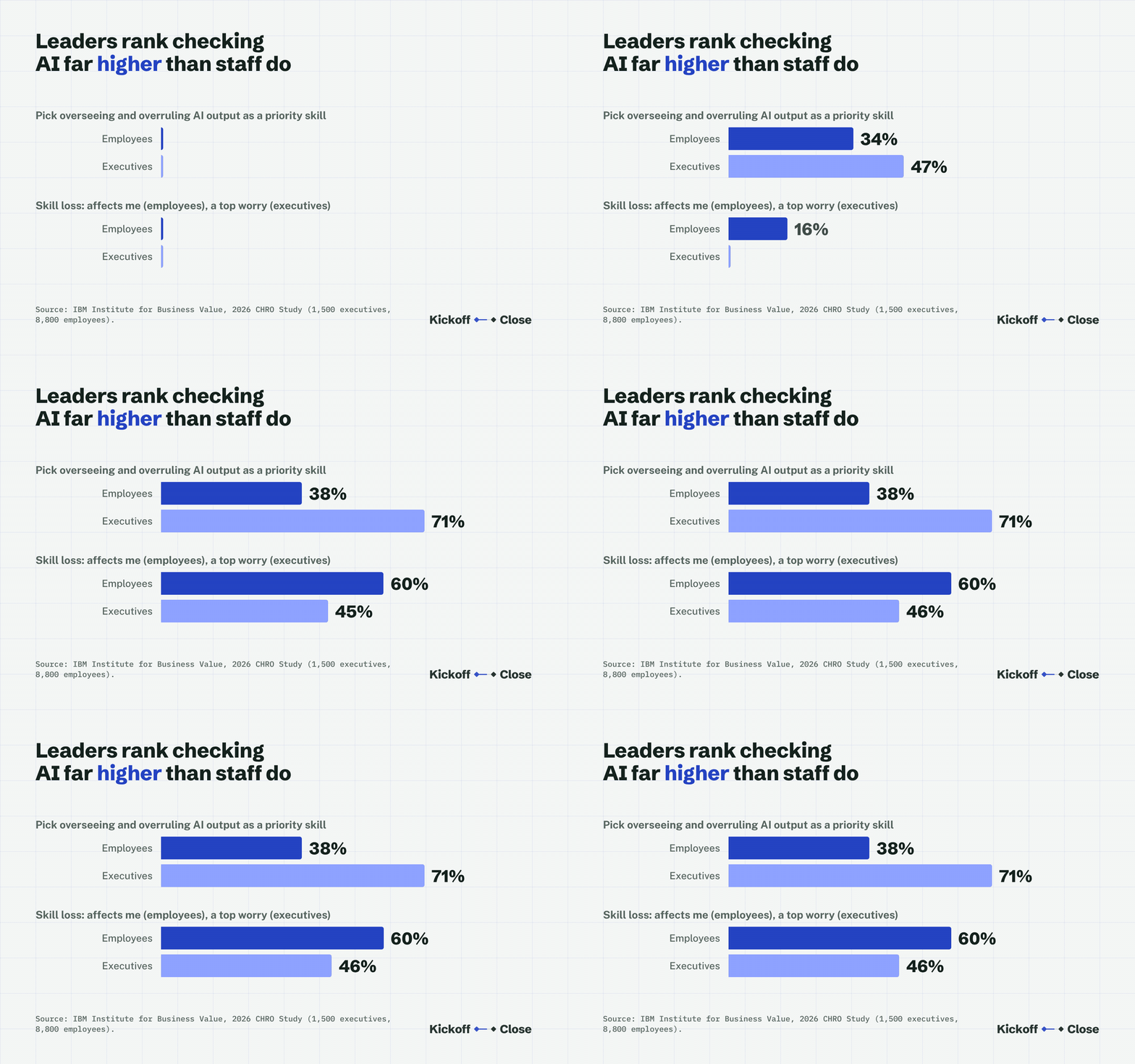
So employees feel the loss, and many of them still don't see reviewing AI work as part of their role. If nobody says it is, they won't raise it until a mistake makes it obvious.
What to do instead:
Write it down: reviewing AI output is part of every role on the project. Put it in the team working agreement so it stops being optional.
In one-to-ones, ask something specific: "What have you stopped doing yourself since you started using AI, and would you still be able to do it next month?"
Review AI-assisted work in retrospectives the way you review estimates. Where did a check catch something, and where did one get skipped?
Myth: Someone above you already has a plan for this
If the MarketScale figure holds, most organizations don't have one yet. Gartner tells CIOs to look for the first signs of slipping skills and step in early, because a gap like that is not something another AI tool can close. Until that happens where you work, the habits on your project are the plan.
What to do instead:
Write a one-paragraph rule for AI-built work that leaves the team: who verifies it, what gets checked and where that's recorded.
Pick the three deliverables where a wrong answer costs the most, such as forecasts, go or no-go recommendations and client commitments, and require a verified version every time.
Share the rule with your sponsor. It shows them the risk is handled, and it gives them something to point to when leadership starts asking.
A starting setup for this week
Choose your three high-stakes deliverables and add the "Checked by, and how" line to their templates.
On the next AI-assisted report headed up the chain, ask your one follow-up question before it goes.
Give each newer team member one task they draft by hand first.
If you'd like that review step already written out as prompts and a checklist, The AI Review Routine packages one you can adapt.
The weak spot rarely shows in the document itself. It shows in the first follow-up question, and you only see it if you ask that question before your sponsor does.
Sources
MarketScale: Gartner, only 40% of CIOs guard against AI dulling staff judgment (the 40% figure, the 533-leader survey and Gartner's personal-verification advice, as reported secondhand)
Gartner: Strategies for CIOs to Combat AI-Induced Atrophy of "Soft Skills" (June 2026 summary on AI weakening judgment and critical thinking)
Lee et al., The Impact of Generative AI on Critical Thinking (CHI 2025) (319 knowledge workers, confidence in AI and critical thinking)
Anthropic: How AI assistance impacts the formation of coding skills (randomized trial, 50% vs 67% quiz scores, interaction patterns)
IBM Institute for Business Value: 2026 CHRO Study, Designing the Thinking Organization (71% vs 38% on overseeing AI output, 60% and 46% on skill loss)
