
Your project tool now has AI agents, and you can picture exactly where one would help: chasing overdue tasks, turning intake forms into projects, drafting the weekly update. Then you click "create agent" and find out you need an admin to do it, and the admin wants to know why.
That gap showed up plainly this week. Writing for UC Today ahead of monday.com's Elevate event on October 28, Rebekah Carter pointed out that co-CEO Eran Zinman told investors in August that plenty of customers want AI but aren't sure how to adopt it. monday.com's own help center says creating or managing its agents takes admin permissions, and people an agent is shared with can run it and chat with it but can't change what it does. monday.com is one example. Many work platforms roll agents out the same way: admins build, everyone else uses what they're given. For a project manager, that leaves three problems to solve before any agent helps your team, plus one trap to avoid.
Issue 1: You can see the agent but you can't shape it
On monday.com, according to its support pages, the person who builds an agent owns it. Sharing lets your team run the agent, talk to it and look over its settings, but changing what it's told to do, which tools it uses or what it can reach is the owner's job alone. The help center also notes there's no way, for now, to move an agent to a new owner. So if an admin builds an agent for your board and later moves on, you may be left with an agent nobody on the project can adjust.
That's a real constraint, but it doesn't have to stop you. It changes who you work with.
Options:
Ask your admin to build it with you. Book 30 minutes with your admin, share your screen and write the agent's instructions together. You bring the project knowledge; they bring the permissions.
Write the agent's job as a short brief before the meeting: the one task, the trigger, the board it touches and what a good result looks like. An admin can set up a clear brief in minutes. A vague idea turns into a week of email.
Ask which shared agents already exist. Some platforms ship ready-made agents that admins can switch on for a board, and running one of those may be enough for a first test.
Agree up front who owns the agent if the builder leaves, and write it in the brief. If the platform can't transfer ownership, name a backup admin who knows it exists.
Issue 2: Nobody showed your team how to use it
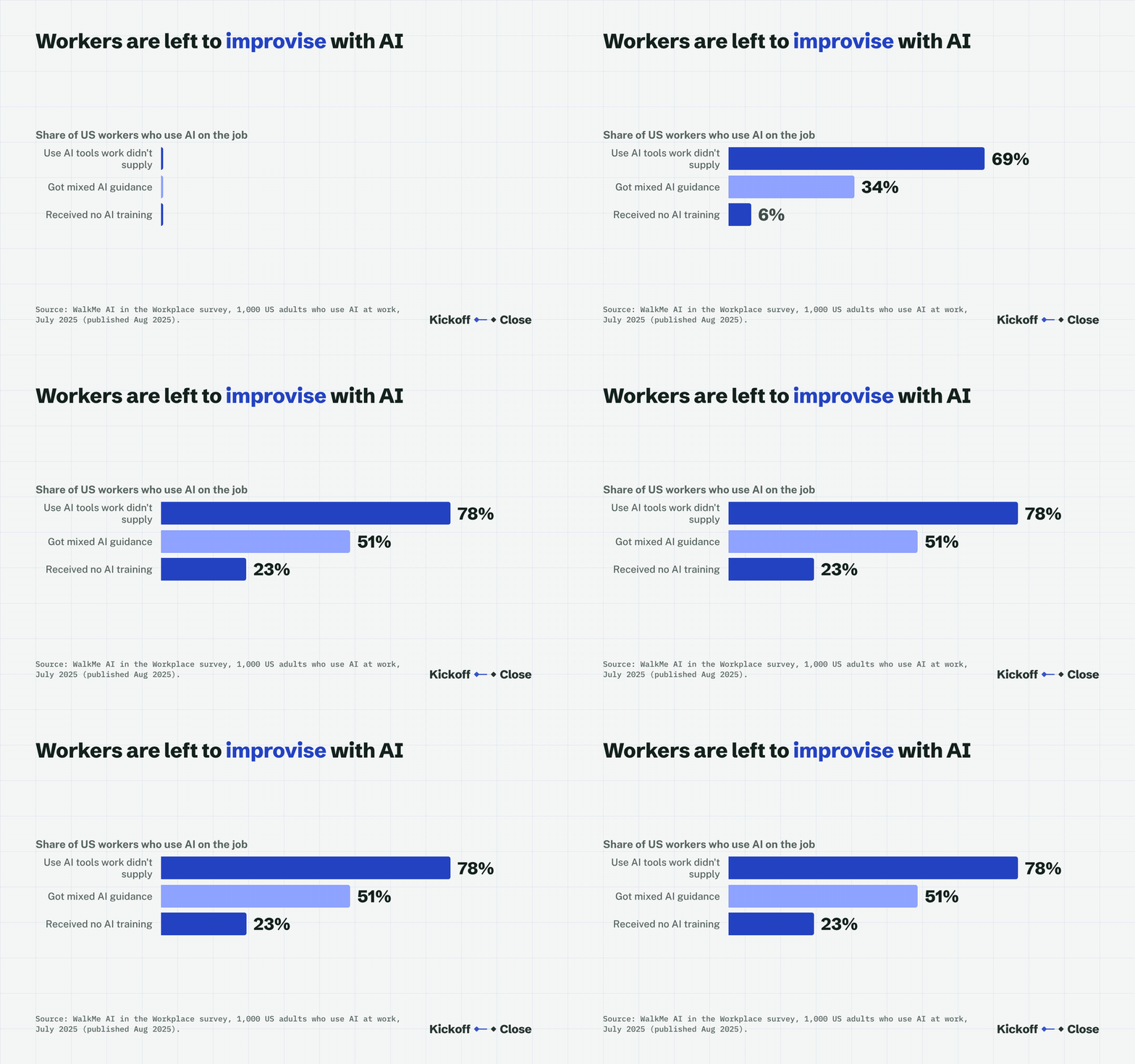
Zinman's admission matches what workers say about AI in general. Among the 1,000 US adults in WalkMe's 2025 survey, all of whom use AI on the job (Propeller Insights ran the fieldwork in July 2025), fewer than one in ten, 7.5%, reported in-depth training, and almost a quarter, 23%, had received nothing at all. Mixed messages were common too: 51% said the AI guidance they'd been given pointed in different directions. Nearly six in ten admitted the manual route is often quicker once you count the time spent learning the tool.
An agent adds a layer on top of that. Someone has to decide what it should do, check its first runs and notice when it drifts. If nobody has practiced on a simple task, a broad agent will feel unpredictable and the team will drop it.
Options:
Pick one narrow, repetitive job for the first agent. "Flag tasks with no owner every Monday" is easier to judge than "manage the project."
Run it on a copy of the board first. Ask your admin for a test board with sample data so the team can watch what it does without touching live work.
Write down what a good run looks like before the first run, so the team judges the agent against a standard instead of a feeling.
Put a 10-minute agent review in your next two team meetings: what it did, what it got wrong, what to change in the brief.
Issue 3: Your admin needs a reason to say yes
From the admin's side, every agent is something new that can act on company data. Carter's piece lists several reasons for caution on monday.com. An agent that is mid-run keeps going even after you tighten the access around it, the activity history a proposed API version lets you pull reaches back only 90 days, and the platform's guides contradict each other on whether an agent can change hands. Credits are a factor too. Agent use spends from an account-wide AI credit pool, and the guide tallies it under the owner's name, so the usage shows up against whoever built the agent.
An admin who has to weigh all of that will sit on a vague request. A specific, small, reversible one is much easier to approve.
Options:
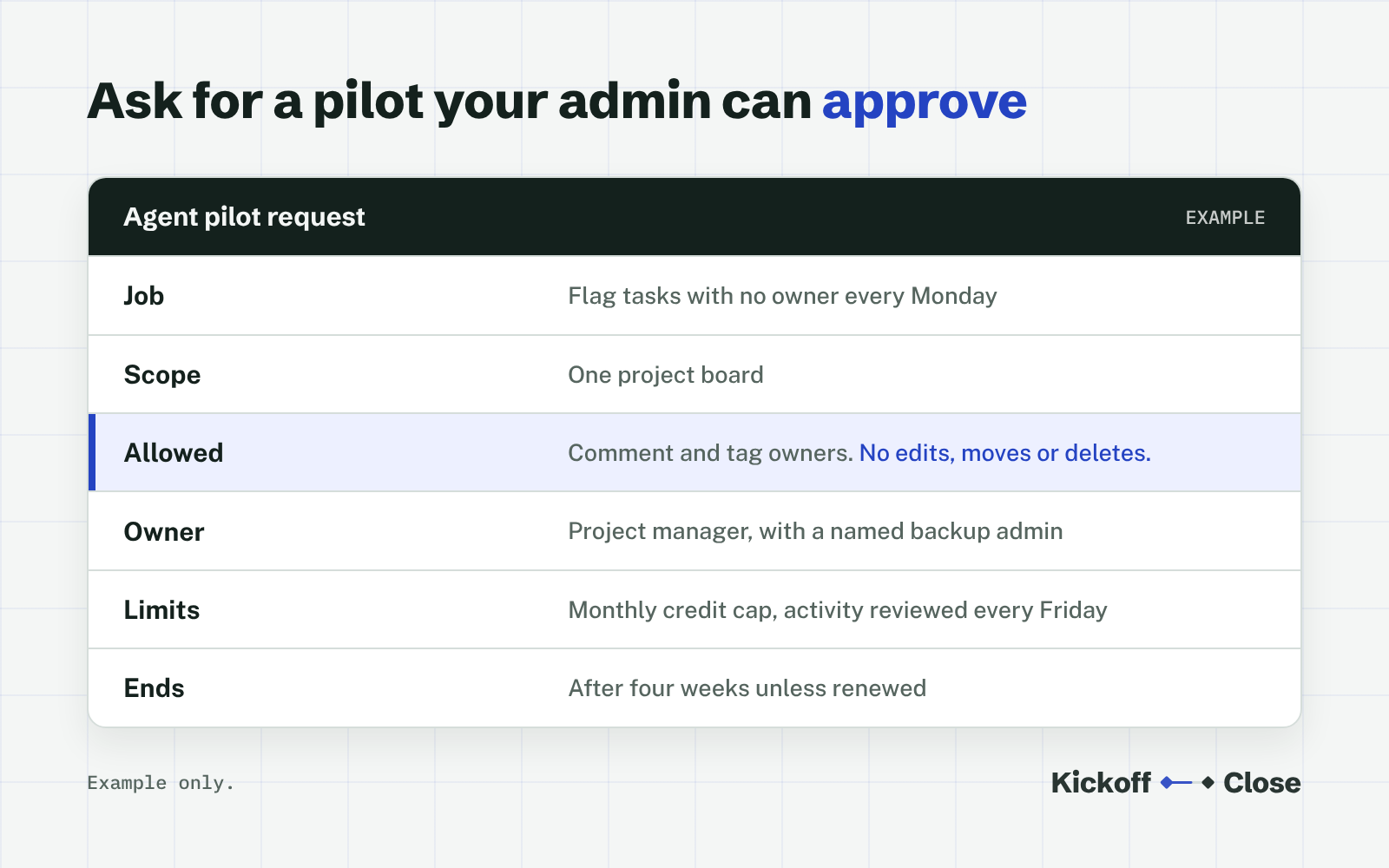
Send a one-page pilot request: the job, the single board, what the agent may change and what it must not touch, the owner, a credit limit, a weekly review and an end date.
Start read-only if the tool allows it. An agent that drafts comments or flags items for a person to act on is a much smaller risk than one that edits tasks.
Offer to review its activity yourself every week and send the admin a two-line summary. That turns their worry about oversight into a job you've already taken on.
Set the end date at two to four weeks out. A pilot with a stop date is easier to approve than an open-ended rollout, and you can ask for more once you have results.
The trap: going around the admin
When the official route is slow, the easy move is to paste board exports into a personal chatbot or connect an outside agent on your own. That's already common. Close to eight in ten of WalkMe's respondents (78%) use at least some AI tools that didn't come from their employer. For a project manager, that usually means client names, budgets and schedules ending up somewhere nobody on your security team can see, and it can make the formal pilot harder to get later.
Options:
Use the AI tools your company has already approved to rehearse. Draft the agent's brief and test the prompt in an approved chat assistant, with sample data, before asking for the real build.
If you need something the approved tools can't do, put that in the pilot request as the reason for it. A clear gap is a stronger case than an enthusiastic one.
Keep anything sensitive out of tools you set up yourself, even for a quick test.
A starting setup for this week
Choose one job your team repeats every week that follows clear rules.
Write the brief in under a page: job, trigger, board, allowed actions, off-limits actions, what a good run looks like.
Ask your admin for a test board and 30 minutes to build the agent together, with you named in the request as the person who reviews it.
Run it on the test board for one week, then on the live board in read-only or suggest mode.
Review its activity every Friday and send the admin a two-line summary.
At the end date, decide with the team: keep it, change the brief or switch it off.
If the pilot works and you want a longer guide to setting up AI automations across your projects, the AI Project Automation Lab covers that ground.
Your admin is the person who gets the call when an agent changes something it shouldn't have. A project manager who arrives with a small scope, a named owner and an off switch has already answered most of the questions that call would raise.
Sources
UC Today, monday.com's AI agents face their biggest test at Elevate NYC (Rebekah Carter, Oct 28, 2026): co-CEO's comment on customers and AI adoption, permission changes and running agents, the 90-day activity-log limit, conflicting guidance on ownership transfer
monday.com support, AI Agents on monday.com: admin permissions required to create or manage agents, owner-only tool edits, ownership not transferable
monday.com support, Run and manage your AI agents: what shared members can and can't do, admin control over sharing, credits drawn from the shared pool
WalkMe, AI in the Workplace survey (Aug 27, 2025): training, conflicting guidance and unapproved AI tool figures from 1,000 US workers who use AI
