
Your team runs a lot of its project work through Notion AI: summaries of long pages, drafts of status updates, an agent that tidies the task board. Starting this month, every one of those actions comes out of a monthly allowance, and when the allowance is gone the work stops until the next reset.
Notion announced the change on October 19, 2026. Anyone signing up for Business or Enterprise has been on the new system since that day. If your workspace already existed, your switch date is November 2. Under the new rules, as Notion's help center lays them out, each person on the plan has two balances. Standard credits, 1,500 of them each month, get spent whenever Notion decides which model handles a request. Select credits, of which you get 500, are what you burn when you override that choice yourself, and they also fund the Custom Agents you own. Unused credits disappear at the end of the month, and you can't hand yours to a colleague. Run one pool dry and anything that depends on it stops working until next month's allowance arrives. The one way around that is a setting, off by default, that lets an admin fall back on purchased Notion credits. Nitish Garg's summary for CellCog pulled together the two follow-on changes that matter most for project managers: meeting notes join the meter on December 1, and a shared agent bills the person who built it.
Notion isn't the only tool moving to a meter, and billing surprises are already common. In Zylo's 2026 SaaS Management Index, nearly four in five IT leaders (78%) said metered or AI-driven pricing had produced a charge they didn't see coming at some point in the last twelve months. For a project manager, the risk is less about the invoice and more about a tool that stops halfway through the month, right before a steering meeting. Here are the four problems to plan for, with options for each.
Issue 1: The allowance resets, and the leftovers vanish
A monthly pool with no rollover rewards steady use and punishes lumpy use. Project work is lumpy. Kickoff weeks, quarter-end reporting and a big client review can burn through more AI work in a few days than a quiet stretch uses in three weeks. Because each member's balance is separate, a teammate's unused credits can't cover you, either.
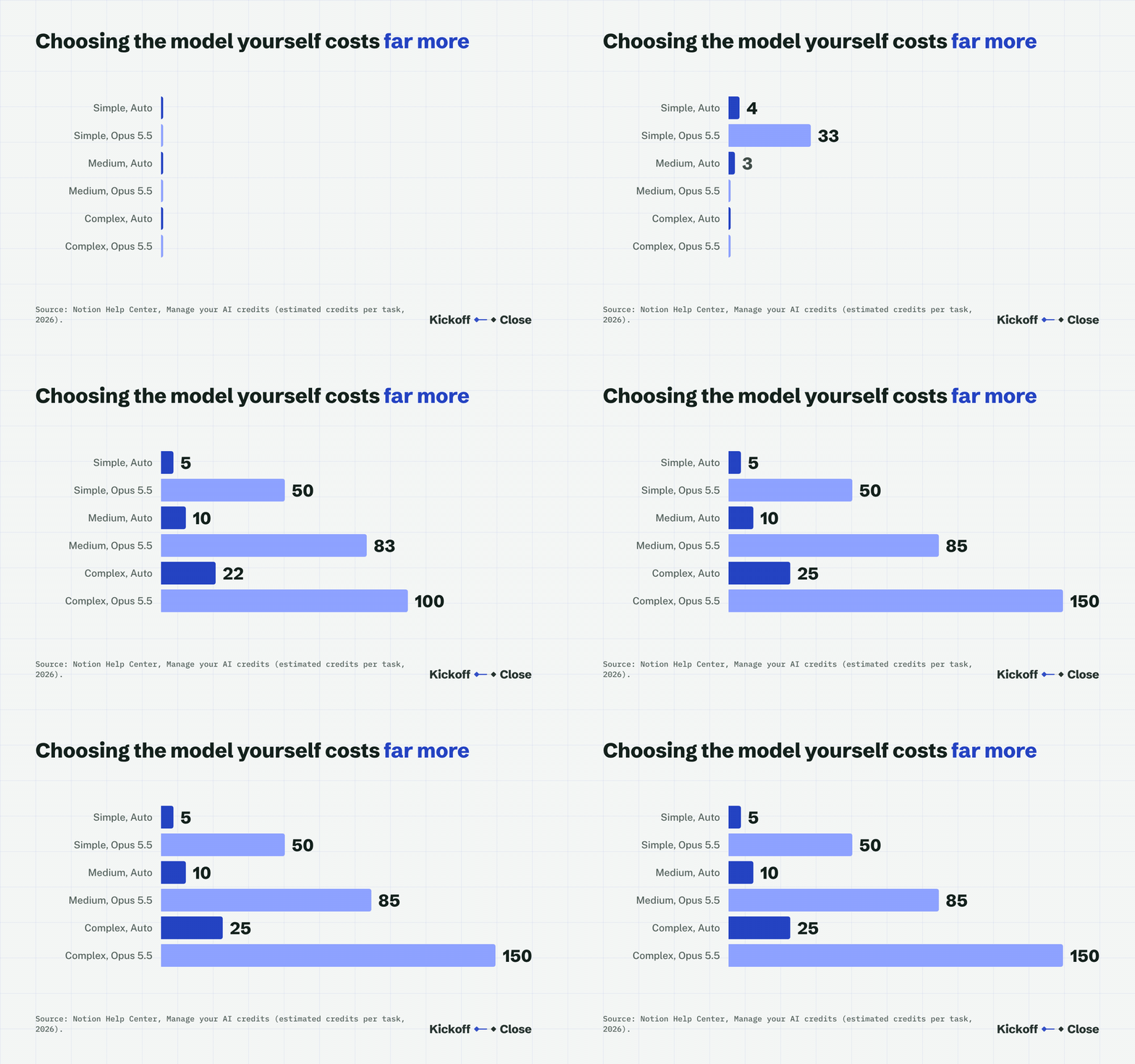
The model choice makes a big difference. Notion's help center puts a simple task at around 5 credits on Auto, its default where Notion chooses, and around 50 if you choose Opus 5.5 instead. At the complex end the estimate is roughly 25 against 150.
Options:
Default to Auto for routine work like summaries, rewrites and quick drafts, and keep picked models for the few jobs where you can see the difference in the result.
Check your balance on a fixed day each week (Settings, then Notion AI, then Usage) rather than finding out from a warning in chat.
Map your heavy AI weeks on the project calendar. If reporting week and a client review land in the same month, start the bulk drafting earlier so the work is spread out.
Agree with your admin, before the first pause, whether the backup setting for paid Notion credits will be on, who can approve it, and what limit applies per person.
Issue 2: Meeting notes join the meter in December
Meeting transcripts don't touch the allowance yet. On December 1, every AI Meeting Notes session starts counting against your Standard allowance, and Notion's help center budgets roughly 10 credits for each hour of meeting. That sounds small until you count a project manager's calendar. Twenty hours of meetings a week is more than 80 a month, which by Notion's figure would use over half of a member's 1,500 Standard credits before any other AI work.
Options:
Sort your recurring meetings into three groups: always transcribe (decisions, client calls, risk reviews), sometimes transcribe, and never (standups that repeat the board, social check-ins).
Let one person record each meeting. Five people transcribing the same call spends five times the credits for one set of notes.
For short internal syncs, go back to a two-line written summary: decisions and owners. It takes a minute and costs nothing.
Review the meeting list again in mid-December, once you've seen a few weeks of real usage.
Issue 3: The team's agent bills whoever built it
Out of the box, a Custom Agent charges every run to the person who owns it, no matter who on the team starts the run. If you set up the agent that triages requests for everyone, your 500 Select credits pay for every run. Once those are used up, nobody on the team can use the agent until your credits refill or someone finds workspace credits to cover it. There's one exception in Notion's agent help page: an agent built before the November 2 switch stays on the workspace's shared credits.
Options:
Before November 2, list the agents your team relies on and who owns each one. Older agents stay on shared credits, so don't rebuild them without a reason.
For any new team agent, ask your admin to fund it from a workspace budget instead of your personal pool. Notion lets admins do this, and owners can request credits through the app.
Give every agent you own its own credit limit. A runaway week then stops that agent instead of draining what you need for your own work.
Write a short note for each shared agent: what it does, who owns it, where its credits come from, and who to tell when it pauses.
Issue 4: You can't see the spending clearly yet
Admins can already see usage per member and set limits on paid credits. Notion's announcement promises an AI Command Center that will break spending down by member, feature and agent and send alerts, but it hasn't shipped yet. Until then, it's hard for a team to tell which features or agents use the most credits, and that kind of blind spot is where surprise charges tend to come from.
Options:
Ask your admin for a monthly export or screenshot of usage per member for the people on your project.
Keep a simple log for the first two months: the date anyone hits a limit, what they were doing, and how long the pause lasted.
Add AI credits as a line in your project risk register, with an owner and a trigger, such as any member passing 75% of a pool before the 20th.
Bring the log to your admin after the first full month. A specific pattern ("our reporting week uses 60% of the month") is easier to act on than a general complaint.
A starting setup for this week

Before Monday, list the team's AI uses in Notion: page summaries, drafts, meeting notes, and each Custom Agent with its owner.
Switch routine requests to Auto and tell the team why.
Sort recurring meetings into always, sometimes and never for transcription, and name one note taker per meeting.
Ask your admin three questions: will paid backup credits be on, who funds shared agents, and how will limits be reported.
Put a weekly balance check and a mid-December review on your calendar.
The teams that feel this change most will be the ones that find out from a paused agent on the morning of a deadline. A project manager who knows which meetings, agents and drafting weeks use the credits can treat the allowance like any other project budget, with a forecast, an owner and a plan for the month it runs short.
Sources
Notion, Notion AI: more for less (Akshay Kothari, Oct 19, 2026): announcement, Oct 19 and Nov 2 dates, planned AI Command Center
Notion Help Center, Manage your AI credits: Standard and Select allowances, no rollover, no transfers, pause when empty, backup Notion credits setting, credit estimates per task (Auto and Opus 5.5), Meeting Notes from Dec 1
Notion Help Center, How AI credits work for Custom Agents: owner's credits by default, spending caps, workspace funding and credit requests, agents created before Nov 2 on shared credits
CellCog, Notion AI Rebuilt: 24-Hour Agents, Auto, New Credits (Nitish Garg, Oct 19, 2026): summary of the credit changes for existing workspaces, meeting notes and shared agents
Zylo, 2026 SaaS Management Index: share of IT leaders reporting unexpected AI or consumption-based charges in the past year
