
A team member sends over the deliverable and it looks great: clean, organized, on time. Then you spend the next hour reading every line, because you can't tell which parts they thought through and which parts a chatbot filled in.
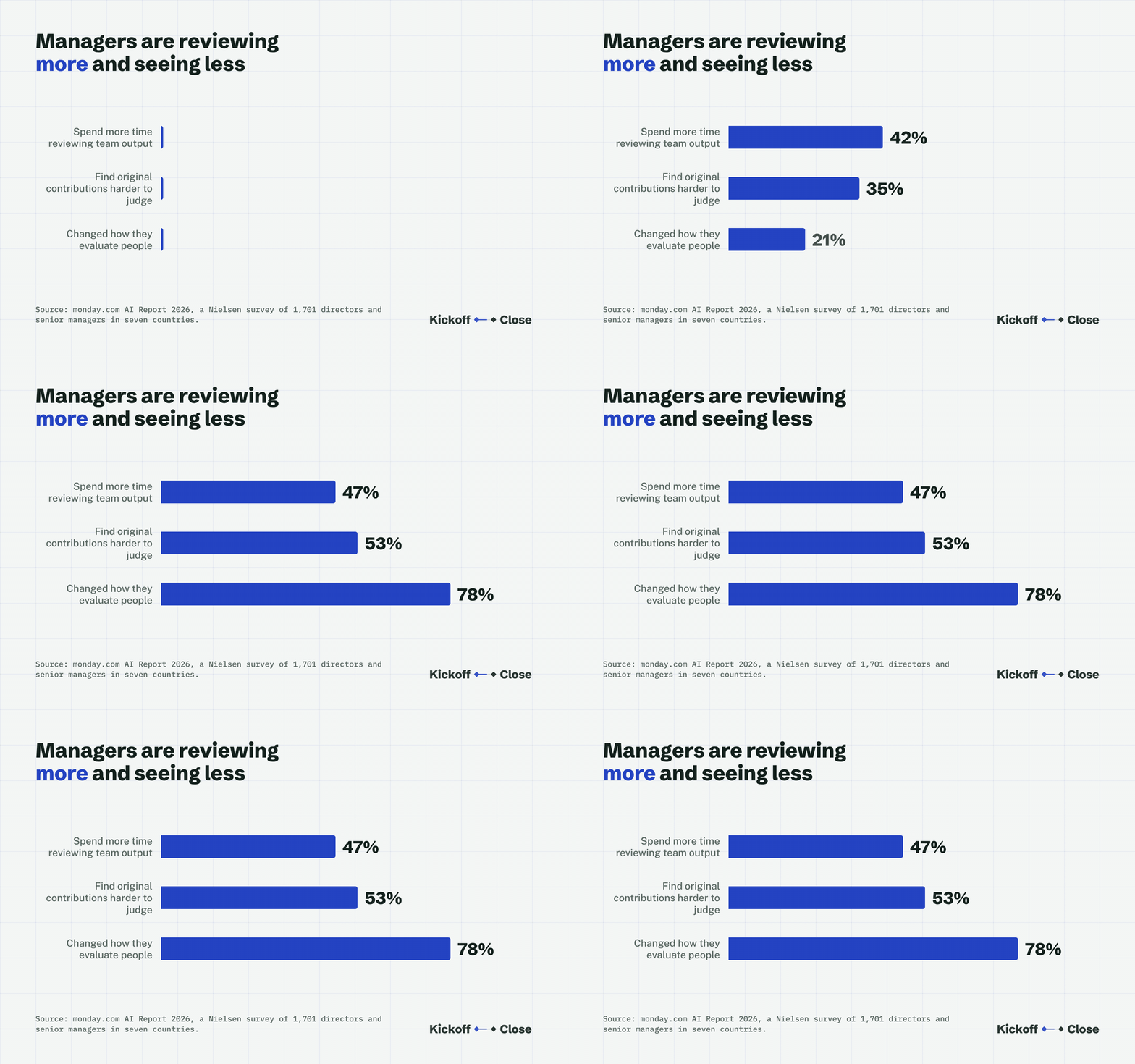
Plenty of managers now know that hour well. monday.com hired Nielsen to poll 1,701 people at director or senior manager level in seven countries, then released the results as its AI Report 2026 on October 21, 2026. Asked about their week since AI showed up, 47% reported that checking and course-correcting team output now takes up more of it. For 53%, judging a person's own contribution has gotten harder: a strong deliverable no longer settles whether the credit belongs to the employee or to the software they used. Most of them (78%) no longer assess their people the way they did before AI.
Most review habits were built for work that a person made from scratch. Below is how that plays out on a project, what it costs, and a different setup where review gets lighter as AI use grows.
The usual way
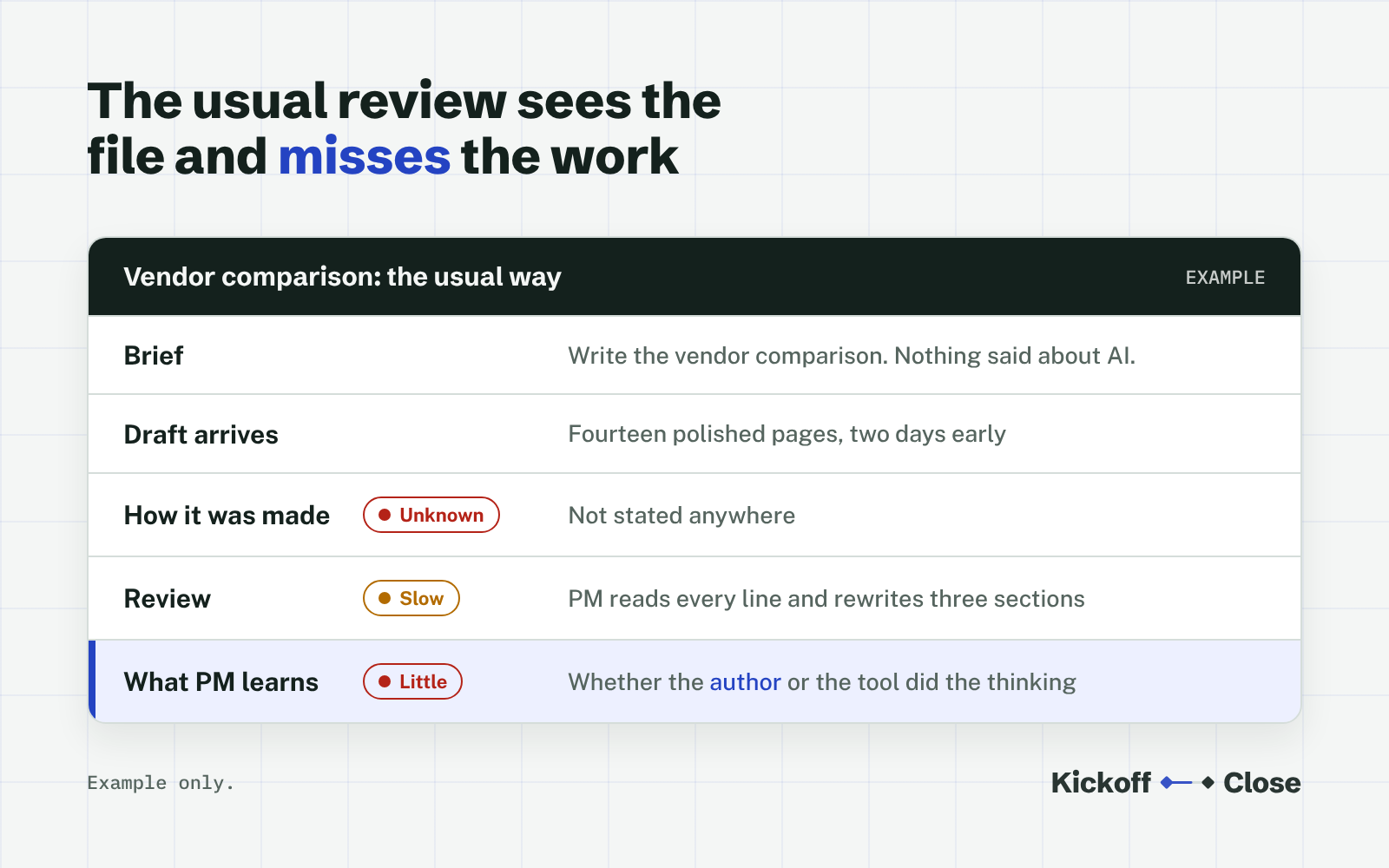
Someone on the team picks up a task: update the risk register, write the vendor comparison, summarize the user interviews. Nobody mentions AI. A few days later a finished file lands in the shared folder. The project manager reads it top to bottom, rewrites whatever feels off, and forms an opinion about how capable that person is.
That routine costs you in three places.
Review time grows with output. Cheaper drafting means more drafts, and each one still gets the full read. In April 2026, Founder Reports put questions to 2,078 working Americans. Of the managers and senior leaders in that group, 57% said a coworker's overreliance on AI had forced them to rework or redo something; 38% of individual contributors said the same. Across everyone surveyed, 77% said they go over a colleague's AI-assisted work with more care than work done without it.
You can't see what the person did. A finished file shows the result and hides the path. You don't learn which sources they opened, which numbers they confirmed, or which AI suggestion they threw away. Those choices are the part of the job you most want to judge, and a clean draft gives you no view of them.
People stop telling you. When admitting to AI feels risky, the use goes underground. ResumeBuilder ran a survey in April 2026 of 1,000 full-time US workers who were worried about layoffs, and asked whether they had used AI to pick up a coworker's tasks. In that group, 62.8% had kept their manager in the dark about the AI's real share of the work. That group was chosen for job anxiety, so read it as a warning sign rather than a national figure. Either way, each shortcut nobody mentions is one you end up reviewing blind.
A better way
Move the review earlier and ask for the thinking to be written down, so you spend your time checking decisions rather than rereading prose.
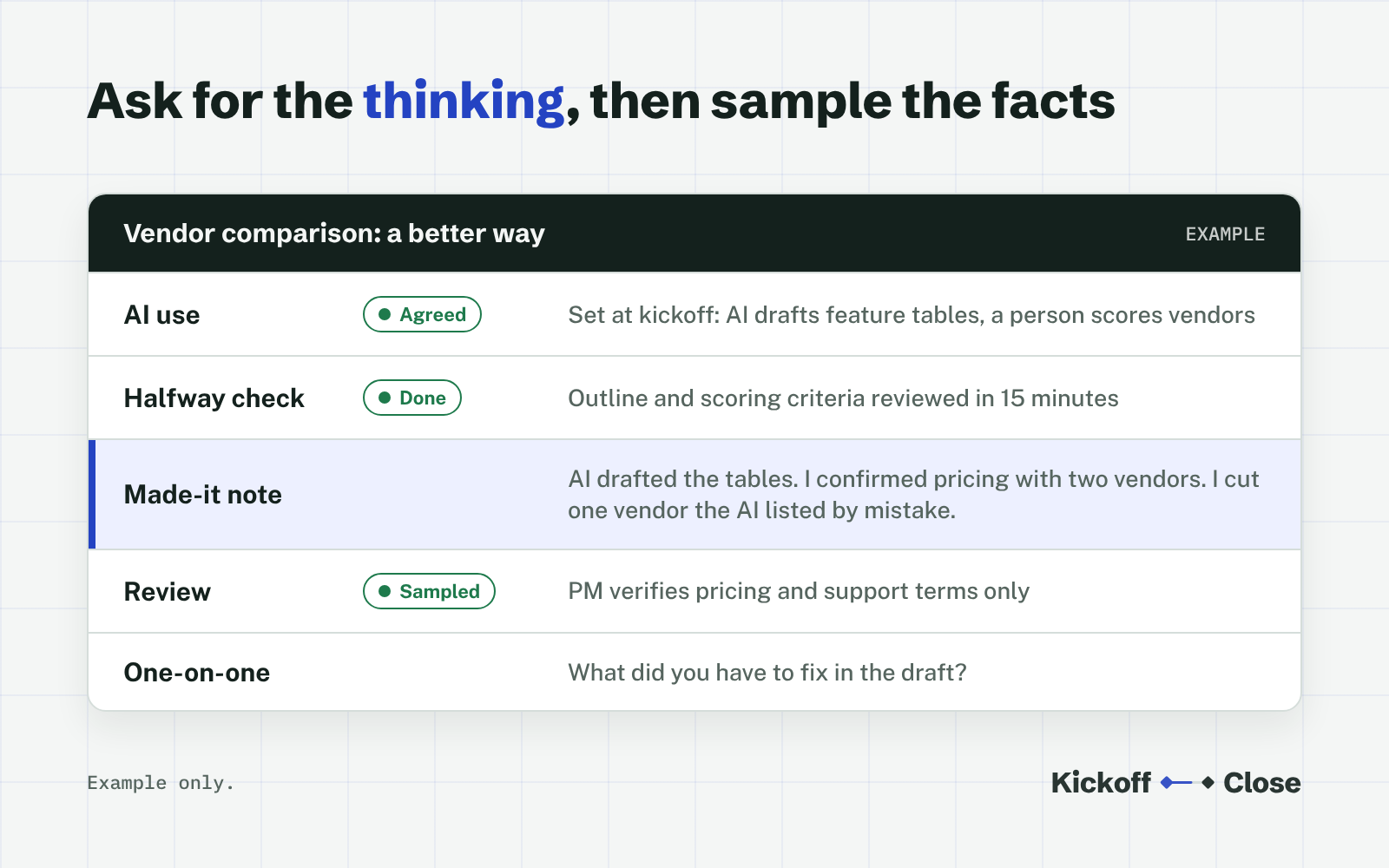
Settle AI use for each kind of deliverable before work starts. For the outputs your project produces again and again, write one line on where AI is welcome and where a person has to own the work. Meeting summaries and first drafts of status updates might be open territory. Estimates, risk ratings and anything bound for the client might need a named person's judgment, with AI in a supporting role. Put the lines in the team charter or the kickoff deck so the question isn't reopened on every task.
Ask for a short "how this was made" note with each deliverable. Three lines will do: what AI drafted or summarized, what the person checked and against which source, and what they changed or rejected. The report's general advice includes a visible log of who did what, human or agent; a three-line note is a version of that small enough that people will fill it in.
Look at the skeleton before the finished piece. For anything that matters, review the outline, the key assumptions and the sources around the halfway mark. Ten minutes at that stage beats an hour spent on a polished draft built on a wrong premise.
Check by sampling. Use the note to pick the one or two claims with the most riding on them, such as a cost figure, a date or a dependency, and verify those yourself. If they hold up, give the rest the level of trust the deliverable warrants. If they don't, the person's checking habit is the thing to work on.
Judge people by the calls they made. In one-on-ones and reviews, talk about what they caught, what they questioned and what they decided. Someone who noticed that the AI summary had dropped a stakeholder's main concern did real work, even if most of the final file was generated.
Making the switch
None of this needs a policy rollout. Pick whatever suits your team and start small.
Begin with one deliverable type. Choose the output that soaks up the most review time, often status reports or requirements summaries, and add the "how this was made" note to that type alone for two weeks.
Go first on disclosure. Add the note to your own work. A line like "AI drafted this summary from the meeting transcript; I checked the dates and the action owners" tells the team that using AI is normal and that checking it is the expected part of the job.
Put a halfway checkpoint in the plan. For the two or three biggest documents in the current phase, schedule a 15-minute outline review as its own task with an owner and a date.
Change one question in your one-on-ones. Replace "How's the report coming?" with "What did you have to fix in the draft?" The answer says more about the person than the file does.
Revisit the AI-use lines at every phase gate. What's fine for a discovery summary may not be fine for a go-live checklist.
For years the finished file was a fair record of the effort behind it. With AI in the loop, the effort a manager wants to see happens before the file exists: in what got checked, what got cut and what got pushed back on. A review that reads only the final draft is reading the part the tool did best.
Sources
monday.com, AI Report 2026: Squinting in the Sun (October 21, 2026; Nielsen survey of 1,701 directors and senior managers): share of managers spending more time reviewing team output (47%), finding original contributions harder to judge (53%) and changing how they evaluate people (78%); the advice to keep a record of who did what
Founder Reports, 2026 AI in the Workplace report (May 6, 2026; 2,078 US workers surveyed in April 2026): managers and senior leaders (57%) versus individual contributors (38%) who fixed or redid AI-reliant work; 77% reviewing AI-assisted work more carefully
ResumeBuilder, survey of 1,000 full-time US workers worried about layoffs (April 2026): 62.8% of workers who used AI to take on a coworker's tasks did not tell their manager how much of the work AI was doing
