
Your team used AI to pull together the options analysis in an afternoon. It went to the sponsor on Tuesday, and three weeks later the decision still hasn't been made, because every page of it is getting checked again.
McKinsey Quarterly described this exact pattern on October 15, 2026, in an article on what its authors call the judgment bottleneck. The authors give the example of a company whose junior team adopted AI. Three to five times as many scenarios started landing on leaders' desks, produced 10 to 20 times faster than before. Decisions didn't speed up. Review stretched out instead, since the executives had no way to see what data and assumptions each conclusion rested on. With a person, they had known whose numbers they could take on trust. With AI output, they couldn't trace the logic, so they checked all of it. That's one company's story, not a survey, but anyone who has waited on a steering committee will recognize it.
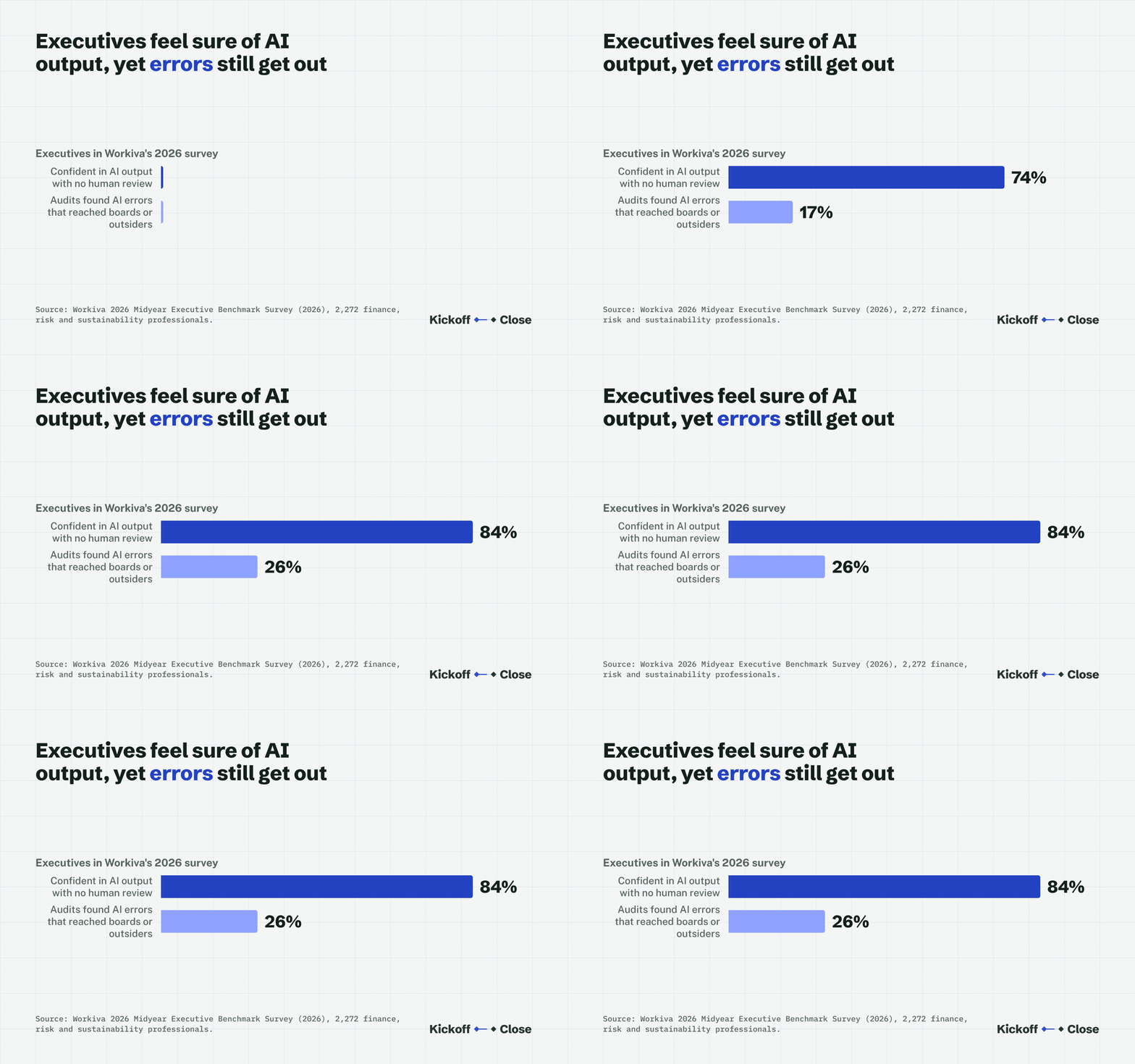
The wider data points in two directions at once. Some leaders over-check, as McKinsey describes. Others barely check at all. Workiva surveyed 2,272 people in finance, risk and sustainability roles for its 2026 Midyear Executive Benchmark Survey. Among the executives, 84% felt at least somewhat sure that AI output was accurate even when nobody had looked it over. Yet about a quarter (26%) reported that their internal audits had caught AI mistakes after those mistakes were already in front of board members or outside audiences.
Both habits cost a project something. Re-checking everything stalls the schedule. Checking nothing lets a wrong number into a sponsor decision. Four gaps sit behind most of it, and each has a practical fix.
Issue 1: Nobody can see what the analysis assumes
When a business analyst builds a cost model, the sponsor can ask them where the numbers came from. AI output usually arrives as a polished deck or summary with the inputs buried or missing. A reviewer who can't find the assumptions has two choices: trust the whole thing or redo the whole thing. Neither helps the schedule.
Options:
Put an assumptions box at the top of every AI-assisted analysis: the three to five assumptions the recommendation depends on, where each one came from, and how confident the team is in it.
Ask the AI tool to show its work as part of the prompt: the data it used, any calculations, and every assumption it made along the way. McKinsey describes one organization that requires exactly this, and expects the team to be able to answer questions on any step.
Mark which parts a person has already checked against a source and which parts haven't been checked yet. Reviewers can then spend their time on the unchecked parts.
Add a short list of what you'd have to believe for the recommendation to hold. It tells the sponsor where to push.
Issue 2: There's more analysis than anyone can absorb
AI makes scenarios cheap, so teams send more of them. McKinsey quotes an executive whose team used to take guidance on a Monday and work on its own for a week. These days the team is back at the executive's door the same afternoon, and there isn't enough review time in the week to match. More options can mean more to read before anyone is willing to choose.
Options:
Start every analysis request with the decision it serves, written as a question with a deadline: "Do we move the go-live to March, yes or no, by the 14th?"
Cap what reaches the decision maker at two or three scenarios. Keep the rest in an appendix for anyone who wants it.
Send a one-page decision brief with the full analysis attached, rather than the full analysis with a summary slide on top.
Book the decision slot on the sponsor's calendar when the analysis is requested, not after it's done.
Issue 3: Every decision gets the same treatment
A small change to the task order and a request to double the budget often go through the same review path, with the same people reading the same volume of material. That makes small calls slow and gives big calls no extra attention.
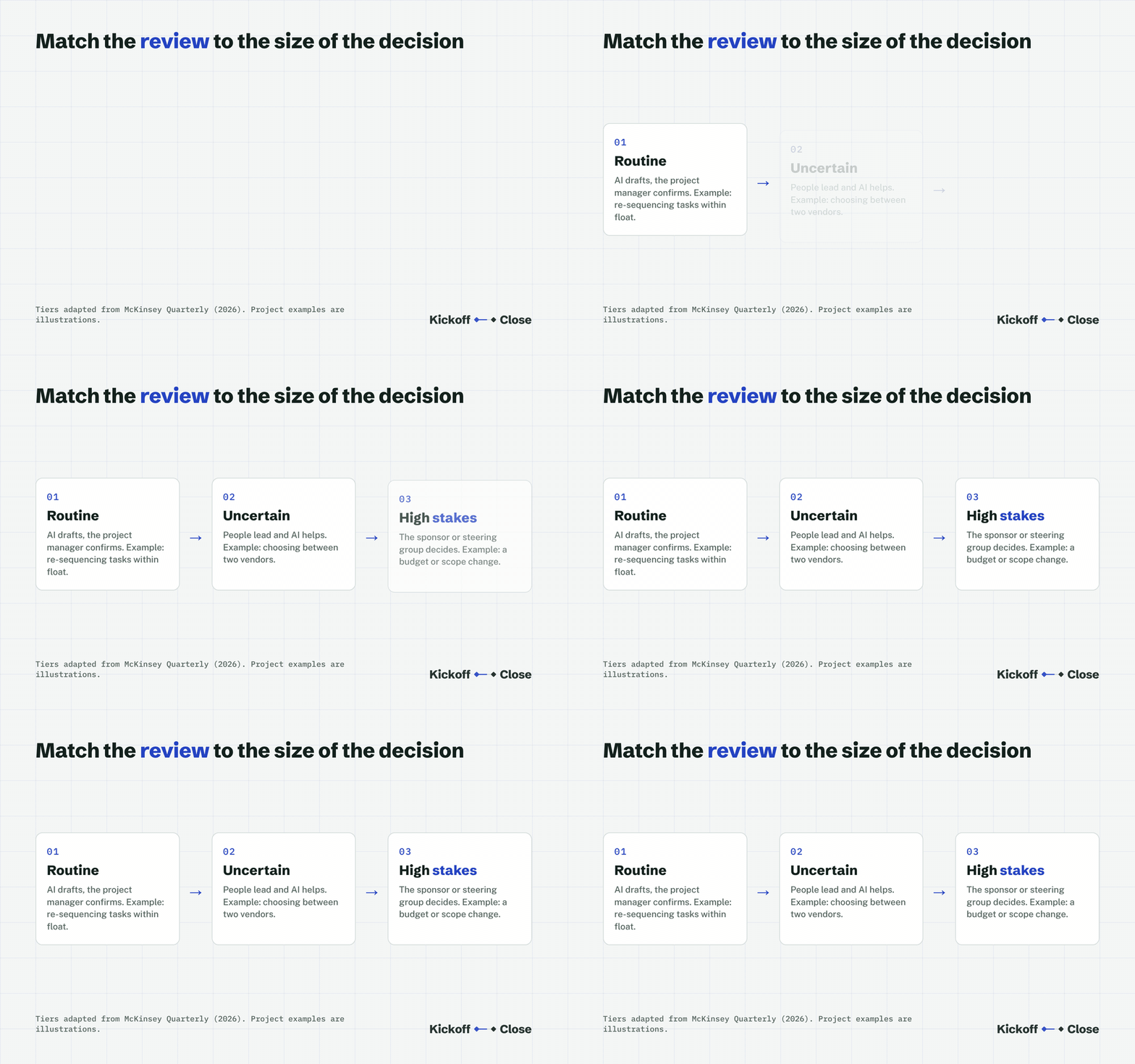
McKinsey's authors suggest sorting decisions by how uncertain and how consequential they are. The repetitive, low-risk ones can run on automation inside set limits. Where the situation is uncertain, people take the lead and use AI for support. And the biggest calls belong to a leader who will answer for the outcome. On a project, that sorting maps onto authority levels you probably already have.
Options:
Add a tier column to your decision log (routine, uncertain or high stakes) and fill it in when the decision is raised.
Write down what counts as routine for this project, such as re-sequencing work within float or reassigning tasks inside one team. Let AI draft those and have the project manager confirm them.
Save the sponsor's and steering group's time for the high-stakes tier, and give those decisions the assumptions box from Issue 1 every time.
Review the tiers at each phase gate. Something routine during build can turn high stakes right before launch.
Issue 4: Review is either a rubber stamp or a full redo
The trust numbers explain why reviews swing between extremes. Charter's AI Pulse research, released October 21, 2026, showed executives putting AI ahead of their own judgment roughly twice as often as other employees do. In Axios's coverage of the survey of 5,002 U.S. office workers, 32.8% of executives said so, compared with 16.3% of individual contributors. On the other side, Workday surveyed 3,200 employees for a January 2026 study. Three in four of them (77%) give AI-generated work at least the scrutiny they give a colleague's, and close to 40% of the hours AI saves end up spent cleaning up after the tool, on things like fixing what it got wrong and checking it a second time. Too little checking lets mistakes through. Unfocused checking eats the time the tool saved.
Options:
Give every consequential decision a named owner who knows the subject well enough to challenge the assumptions. Put the name in the decision log.
Check the assumptions, not every sentence. Ask the owner to confirm the top three against a source and sign off on those.
Use a second AI pass as a critic before the human review. Ask it to argue against the recommendation as a skeptical finance lead, then fix or flag whatever it finds.
Record what was checked and by whom in one line under the recommendation. The next reviewer doesn't have to start from zero.
A starting setup for this week
Pick the next decision your project is waiting on and send it as a one-page brief:
The decision: one question, with the date it's needed by and its tier.
The recommendation: one sentence.
Key assumptions: three to five, each with its source and a confidence level.
What you'd have to believe: two or three conditions that must be true.
Checked so far: what a person verified, and who.
Owner: the person accountable for the call.
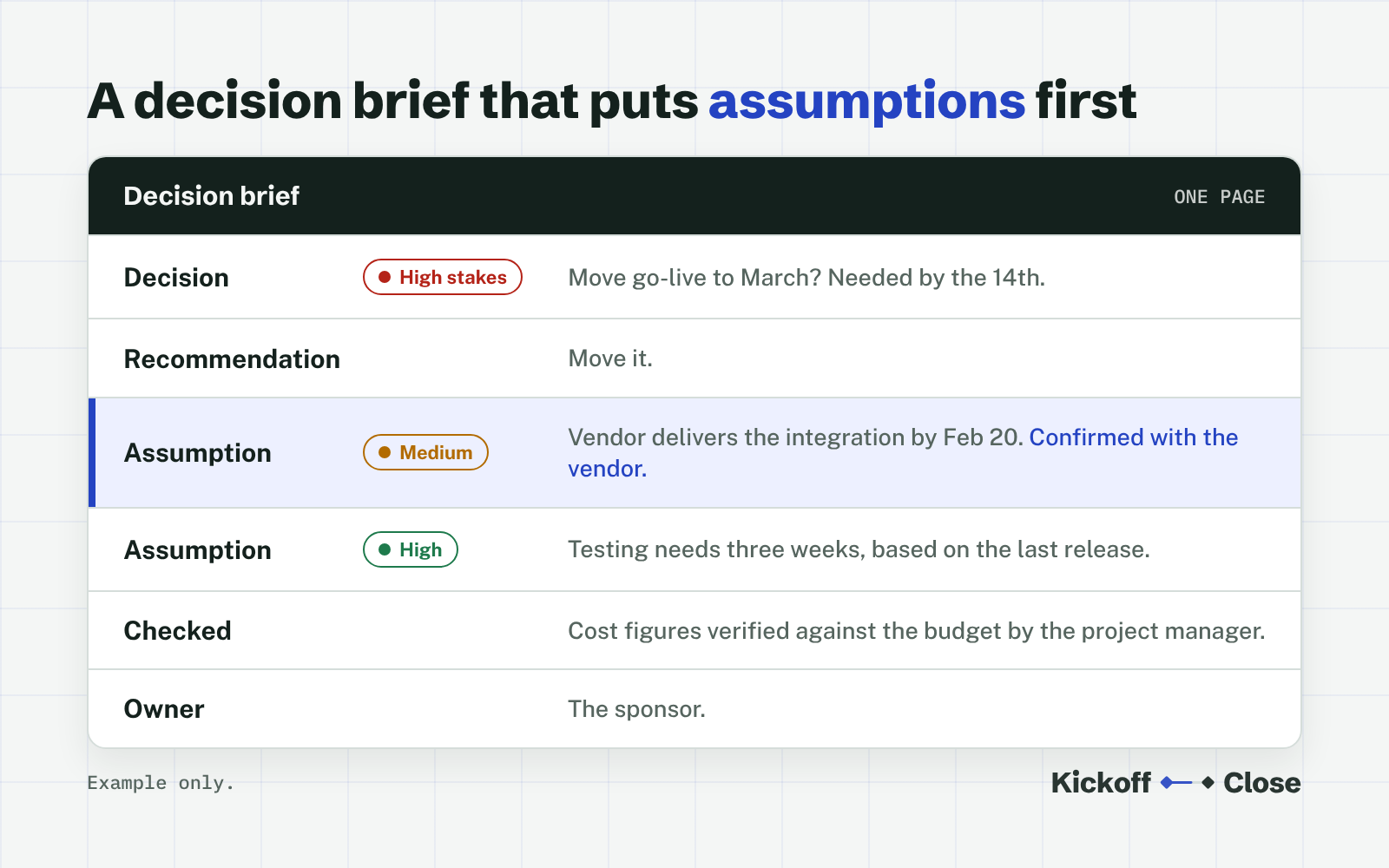
Attach the full AI analysis underneath for anyone who wants to dig in. Most sponsors read the brief, question one assumption and decide in the same meeting.
The tools already took the analysis from weeks to hours. What still takes weeks is a person getting comfortable enough with the reasoning to put their name on the decision, and a single page listing the assumptions gets them there faster than another twenty slides.
Sources
McKinsey Quarterly: The judgment bottleneck, balancing AI and human speeds in strategy (October 15, 2026): the company example (10 to 20 times faster, three to five times as many scenarios, slower review), the executive reviewing within hours, the show-your-work requirement and the three decision tiers. Client examples, not a survey.
Workiva: One in four executives say AI errors have reached external audiences or boards (August 11, 2026): 84% at least somewhat confident in AI output without human review, 26% with audit-detected AI errors reaching external audiences or boards; 2,272 respondents.
Charter: AI Pulse research (October 21, 2026): executives about twice as likely as workers to trust AI over their own judgment.
Axios: Executives are more likely to trust AI than themselves (October 21, 2026): 32.8% of executives and 16.3% of individual contributors, from Charter's survey of 5,002 U.S. office workers.
Workday: Companies are leaving AI gains on the table (January 14, 2026): 77% review AI work as carefully as human work or more; nearly 40% of saved time lost to rework; 3,200 respondents.
