
You lead a project team, and AI now drafts a fair share of what you send them: the weekly update, the reply to a tricky question, sometimes the first pass at a decision. It saves time, and you probably assume nobody can tell.
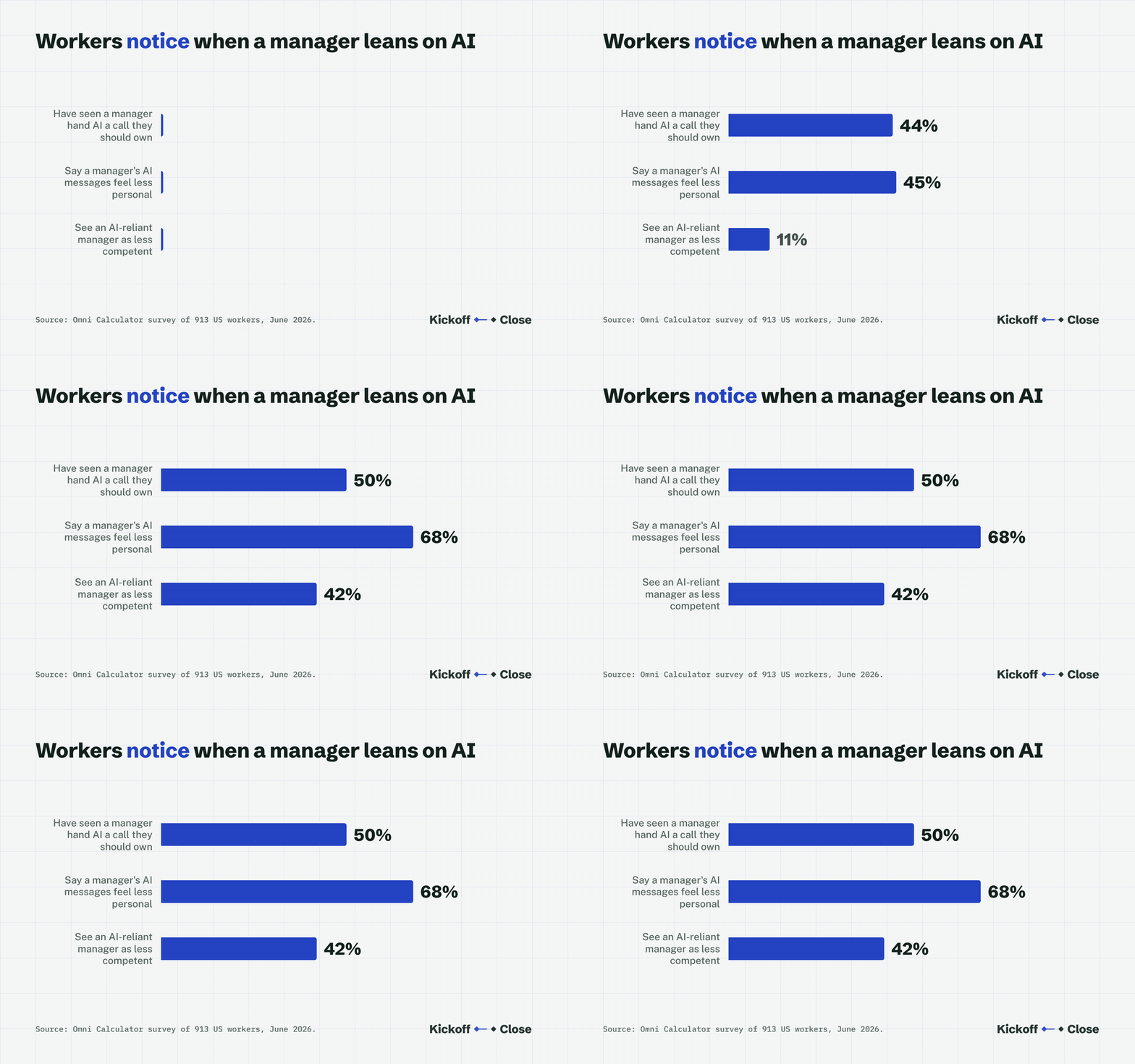
Plenty of them can, and it changes how they see you. In June 2026, Omni Calculator put its questions to 913 working people across the US, all with a boss of their own. Half of them had a story to tell: a question or a decision that belonged to their own boss had, as far as they could tell, ended up with a chatbot instead. For 42% of everyone surveyed, it was not the first time. The same share, 42%, told the researchers that heavy AI use makes a manager look less capable. The firmest result of all: 68% say a note from their manager feels less personal once AI has written it.
An earlier study points the same way. Anthony Coman (University of Florida) and Peter Cardon (University of Southern California) showed 1,100 professionals versions of a supervisor's note of congratulations and varied how much AI help each one supposedly had, from a little to a lot. With light help, 83% saw the supervisor as sincere. With heavy help, that fell to somewhere between 40% and 52%. Ratings for professionalism slipped too, from 95% down to the 69 to 73% range.
Project leads can keep using AI. The catch is that your team sees how you use it and reads your judgment from what they see. Here is where the trust leaks out, and what you can do about each part.
Issue 1: Handing off the calls people expect you to make
A project lead is paid for judgment: which risk to escalate, who takes the extra work, whether the date holds. When a team member asks you one of those questions and the answer comes back sounding like a chatbot, they hear that you didn't think about it. In the Omni survey, 18% said their manager had made a decision with AI instead of doing it themselves, and 20% said a question they asked had been answered that way. Smaller shares reported AI handling a conflict or sensitive issue (13%) or coaching and career advice (12%).
Younger staff are the toughest audience here: 58% of Gen Z respondents tied heavy AI use to lower competence, compared with 34% of Gen X.
Options:
Sort your work into two piles. AI can gather, summarize and draft options for any decision. The choice itself, and the reason for it, comes from you.
When you do use AI to think through a call, say what you weighed. "I looked at three ways to resequence this and picked the one that protects the client demo" shows the judgment was yours.
Answer direct questions from your team in your own words first, even briefly. You can follow up with a fuller, AI-assisted write-up if one is useful.
Keep conflicts, performance conversations and career advice off the AI list entirely, or limit AI to helping you prepare notes you never send.
Issue 2: Messages that don't sound like you
In the Omni data, workers mostly catch AI writing by ear. Nearly half (45%) said the tell is a note that sounds unlike their manager, and 40% pointed to flat, machine-like phrasing. Padding, thin advice and a lack of inside knowledge mattered far less, at 15 to 16% apiece. About half the workers said they could tell at least sometimes.
Options:
Give your AI tool three or four messages you wrote yourself and ask it to match your length, greetings and phrasing. Save that as a standing instruction so you don't repeat it.
Before sending, cut anything you would never say out loud. Long preambles, stacked adjectives and tidy three-part lists are the usual suspects.
Add one detail only you would know: the client's name for the milestone, what came up in yesterday's standup, who stayed late.
Read the draft as the person receiving it. If it would work just as well sent to anyone on any project, it needs another pass.
Issue 3: Treating every message the same way
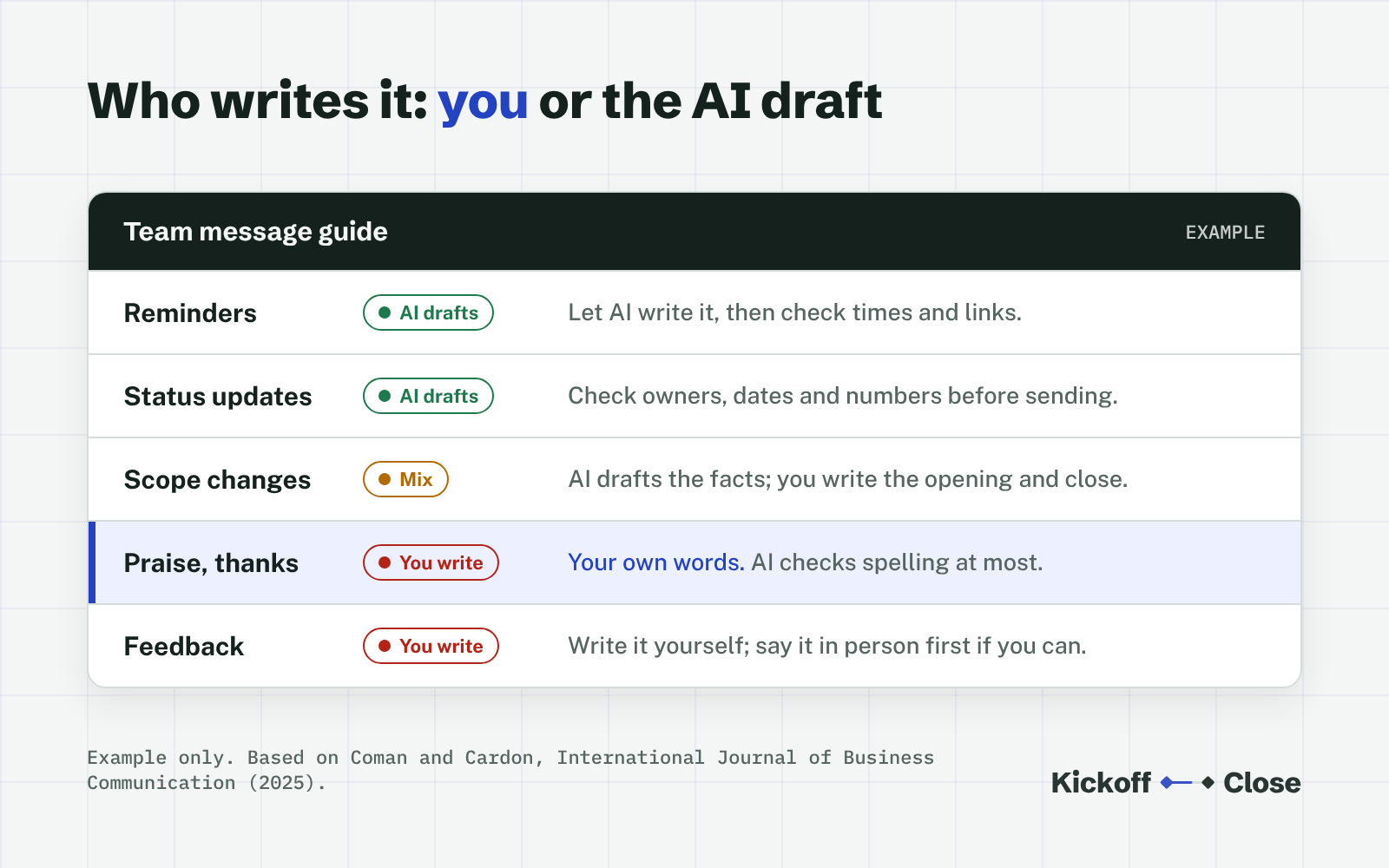
The Florida and Southern California research draws a useful line between logistics and relationships. A heads-up about a meeting or a plain factual notice went over fine with AI help. Notes meant to praise, encourage or give someone personal feedback are another story. The researchers would keep AI's role small there. Those are the notes where a reader wants proof you meant every word. The researchers also found that people judge their own AI use more gently than their manager's, so your sense of what "seems fine" is probably more forgiving than your team's.
Options:
Let AI draft logistics freely: agendas, schedule changes, meeting recaps, status summaries you review.
Write recognition, bad news, feedback and anything about a person's role yourself. Use AI for spelling and grammar at most.
For the in-between messages, like a scope change that affects someone's workload, draft the facts with AI and write the opening and closing lines yourself.
Issue 4: Leaving your team to clean up
When an AI-assisted message goes out unchecked, someone downstream pays for it. Most of Omni's respondents (63%) said they spent no time each week fixing or decoding their manager's AI output, but 20% spent up to half an hour and a smaller group spent more. Whether it costs trust is still an open question. On that point the room divides almost down the middle, with 35% rejecting the idea that a manager's AI use makes them doubt the manager's judgment and 36% saying it does.
That split is useful information. Your team hasn't made up its mind about AI-using managers, so your habits will decide which way they lean.
Options:
Check every AI-drafted instruction for owners, dates and numbers before it goes out. Those are the details people act on, so a wrong one costs the most.
Be open about how you use it. A one-line team norm such as "I use AI to draft updates and summaries; decisions and feedback come from me" removes the guessing.
Ask once in a retro whether any of your messages have been confusing or felt off. You will hear about the problems you can't see.
A starting setup for this week
List the last ten messages you sent your team and mark each as routine or relationship.
For the routine ones, set up a voice instruction from your own writing so future drafts sound like you.
Move recognition, feedback and sensitive replies to a "write it myself" list and keep it next to your AI tool.
Post your one-line AI norm in the team channel.
In two weeks, ask the team whether updates have been clearer.
If you'd like a broader set of prompts and routines for the leadership side of running projects, The AI Project Leader's Playbook collects them in one place.
The time AI saves on the routine messages is the time to spend on the few your team will remember: the thank-you after a hard release, the honest answer about why the plan changed. Those are the ones that tell people who is leading the project.
Sources
Omni Calculator, Survey: Half of Workers Have Caught Their Bosses Using AI (2026): June 2026 survey of 913 employed US adults on managers using AI for questions and decisions (50%, 42% more than once), tasks handled with AI, giveaways (45%, 40%), cleanup time, trust (36% vs 35%), competence (42%; Gen Z 58%, Gen X 34%) and less personal messages (68%). Online panel via Prolific; margin of error about 3 points.
University of Florida News, Is writing with AI at work undermining your credibility? (Aug 6, 2025): study by Anthony Coman and Peter Cardon in the International Journal of Business Communication, 1,100 professionals; sincerity (83% low AI help vs 40 to 52% high), professionalism (95% vs 69 to 73%), routine vs relationship messages, and the self versus manager perception gap.
HR Dive, Managers risk loss of trust by over-relying on AI-written messages, study finds (Aug 21, 2025): independent coverage of the same study and which kinds of messages suit AI help.
