
Your team has an AI agent updating tickets, sending follow-ups or moving files on its own, and most days it does fine. Now picture the afternoon it doesn't: who on your team could switch it off, and how long would that take?
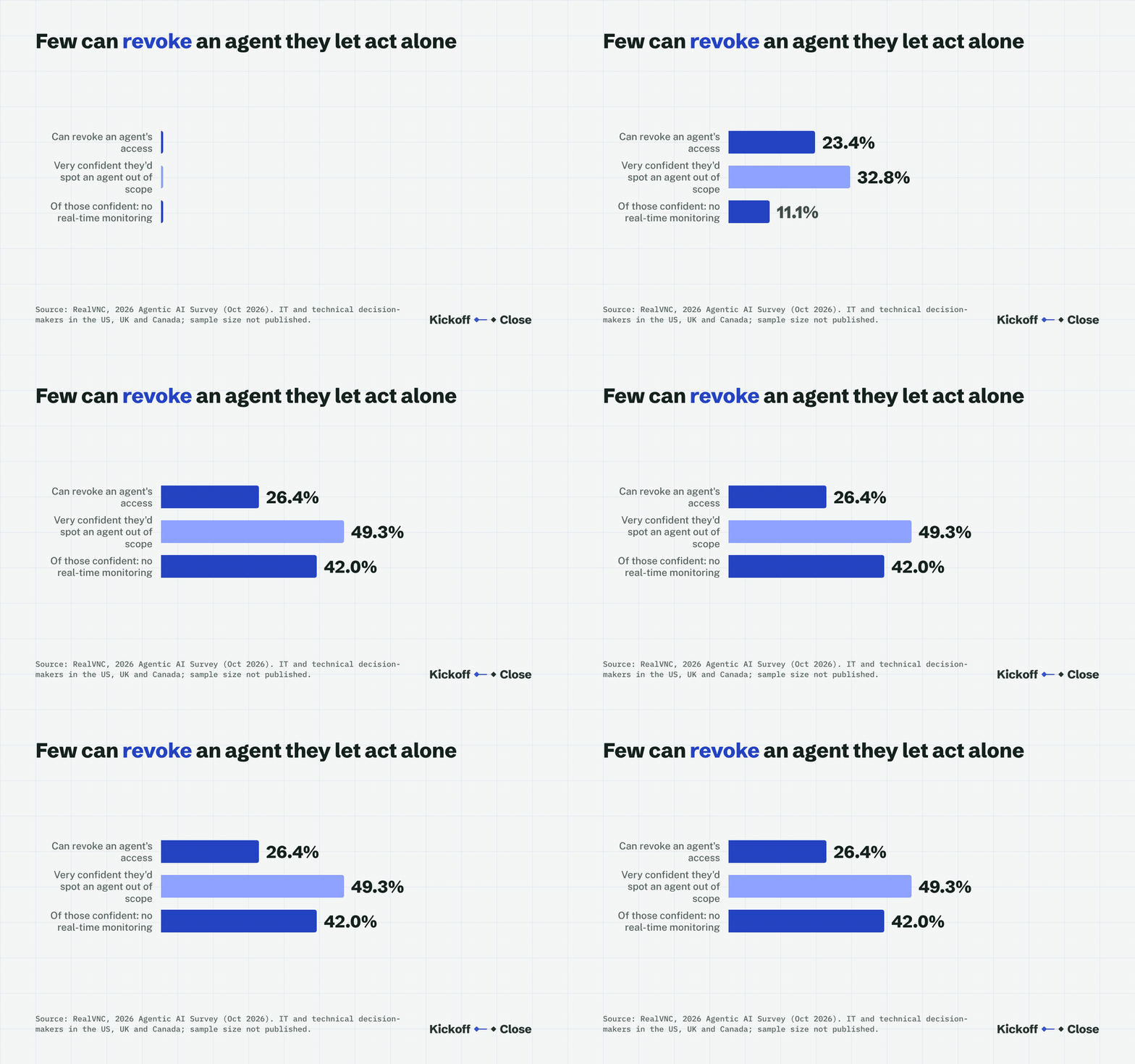
For a lot of organizations there isn't a good answer yet. In late October, RealVNC, a remote access software company, released its 2026 Agentic AI Survey of IT and technical decision-makers in the US, the UK and Canada. In most of the organizations surveyed (close to three in four), an agent can take an action and nobody has to approve it first. Revoking an agent's access, though, was something only 26.4% could do. Look only at the companies giving agents that freedom and it gets worse: 75.5% of them had no means to pull the access back. The release doesn't give a sample size, and RealVNC sells a product aimed at this exact problem, so treat the figures as a strong signal more than a precise measurement.
A separate VentureBeat survey from September 2026, covering about a hundred enterprises, lands in the same place. Asked who could cut an agent off within minutes, just 14 had an answer. The largest group, 45, expected a central team to manage it in a matter of hours, 17 said it could stretch past a day, and roughly two dozen couldn't say whether every agent could be cut off.
That makes this a project problem as much as a security one. The agent is working in your tickets, your client emails and your schedule, so when it goes wrong the cleanup lands on your project. Here is where the off switch tends to break down, and what you can do about each part without waiting for a new tool.
Issue 1: Nobody knows which switch to pull
You can't stop an agent quickly if nobody can say where it lives. Agents show up through automation rules, add-ons inside the tools you already use, and helpers that individual people set up for themselves. When something goes wrong, the first half hour disappears into working out which agent did it and who built it. One in five VentureBeat respondents had no count at all of the agent identities in use.
Unowned agents also seem to be where trouble starts. RealVNC reported that 56.2% of organizations with agents running outside formal IT or security approval had an incident, against 11.7% of those without. RealVNC itself calls that an association rather than proof of cause, but it's a good reason to know what's running.
Options:
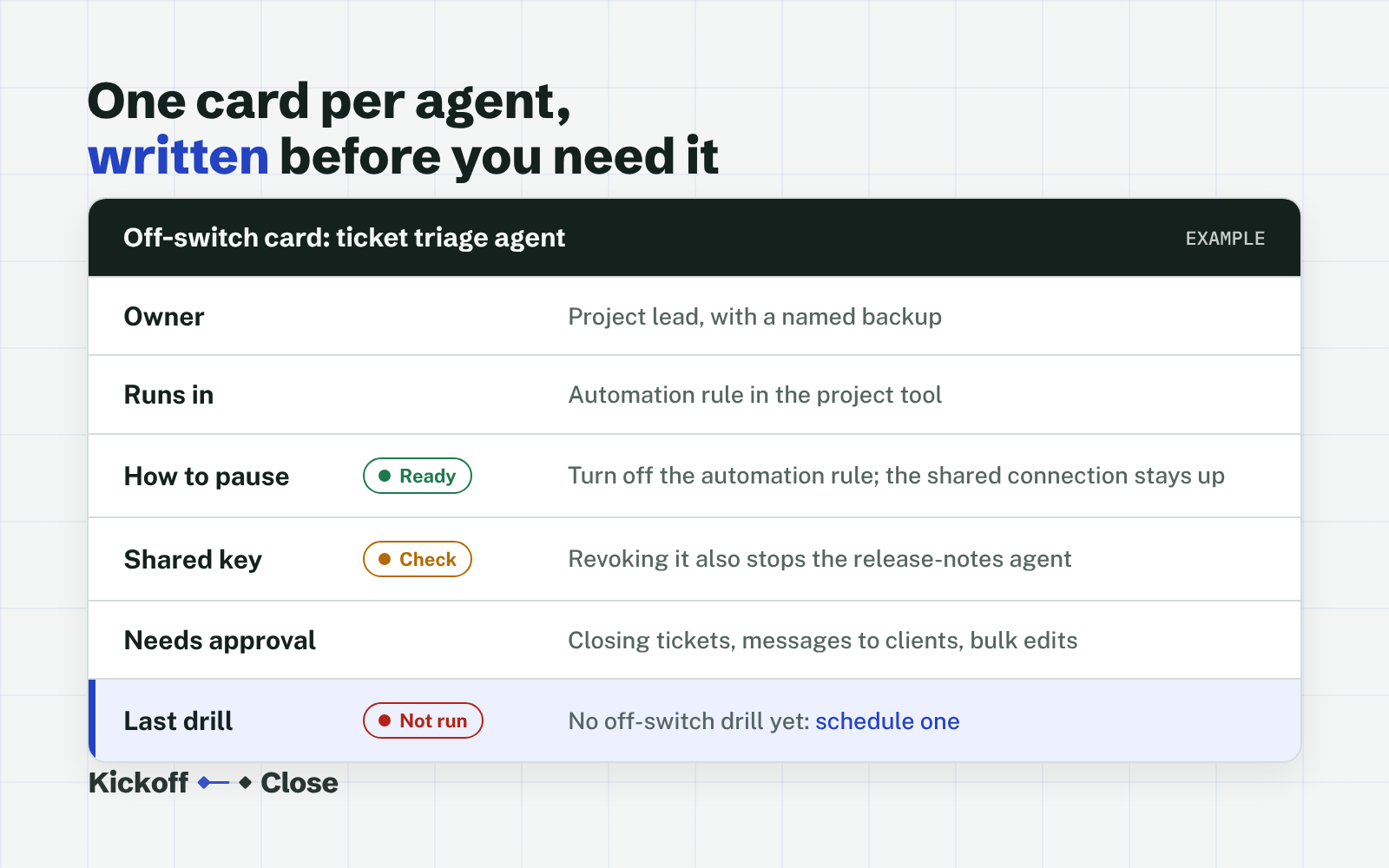
Keep a one-page list of every agent that touches your project: what it does, who owns it, which tool it runs in and exactly how to stop it. If you already track agents for access reasons, add an off-switch column to that list.
Name a backup owner for each agent, so stopping it never depends on one person being online.
Treat any agent nobody will claim as switched off until someone does.
Issue 2: One shared key stops everything or nothing
When several agents, or an agent and a person, log in with the same credentials, cutting off one of them cuts off the rest. People then hesitate in the moment because pulling access would break an integration that works, and the misbehaving agent carries on. Even well-organized teams have this gap. VentureBeat singled out 40 respondents with mature agent programs, the kind that hand each agent a narrow identity and check permissions at run time. Yet at 17 of those 40, at least part of the agent fleet still runs on a login it shares with others.
Options:
Ask for each shared agent to get its own account or API key, starting with the ones that can change records or send messages.
Where that can't happen yet, write down everything that would stop if you revoked the shared key. The hard call is easier to make on a calm day than during an incident.
Look for a pause inside the tool first. Turning off the automation rule or the agent itself halts the work without breaking the connection everything else depends on.
Plan more than one level of stop. A Cloud Security Alliance blog post by Pravin Kothari, who runs an AI security vendor, makes the case for graduated containment: sandboxing, human approval, automatic breakers for loops or unusual activity, and a full shutdown as the last step. For a project team, "pause, require approval, shut down" covers most of it.
Issue 3: Revoking access doesn't undo what the agent already did
Stopping an agent ends new actions. The emails it already sent stay sent, the fields it changed stay changed, and the data it read is still sitting in its working context. A WorkOS post from October puts it plainly: once an agent has pulled records into its context, cutting the connection leaves that copy behind. Sessions and tokens can also outlast the moment someone believes access was cut.
Options:
For each agent, list the actions that can't be reversed (messages to clients, deletions, publishing, closing work) and put a human approval step in front of them. Most of the harm a runaway agent can do sits on that short list.
Make agent changes easy to trace with a log or saved filter of what each agent changed, so you can find and undo its work after you stop it.
Add "clear the agent's memory or context" and "check what it read" to your offboarding steps when a project, client or contractor wraps up.
Issue 4: Confidence with nobody watching
Someone has to notice before anyone pulls the switch. Half of RealVNC's respondents (49.3%) were sure they'd spot an agent straying beyond its job. Of that sure-of-themselves group, 42.0% weren't watching agents in real time at all. Piling on controls didn't seem to help either: RealVNC couldn't find any measurable tie between the size of an organization's control list and its incident history.
For project managers, that last finding is the useful one. A long list of controls on paper does little if nobody looks at what the agent did this week.
Options:
Put a short, regular review of agent changes on someone's calendar, with a named owner. Ten minutes on a filtered view each week is plenty to start.
Agree in advance on the signals that mean "stop it now": an agent working in a project outside its scope, sending far more messages than usual, or repeating the same action in a loop.
Log those signals and the off-switch steps in your project's risk register, the same way you'd record a key supplier dropping out.
A starting setup for this week
Run a 30-minute off-switch drill on one agent you can safely pause.
Pick the agent with the most reach on your project and check with its owner that a short pause won't hurt anything.
Start a timer and have the backup owner, not the person who built it, stop the agent using only the written steps.
Confirm it stopped: no new changes, no new messages, and nothing else went down with it.
Note how long it took, what was missing from the steps and what else stopped.
Turn it back on and fix the gaps in your agent list.
If the drill takes longer than the agent would need to do real damage, that gap is the first thing to close. If you'd like a structured way to build project automations with approval points and pause steps designed in, The AI Project Automation Lab includes that setup.
Every agent gets tested on whether it can do the job before it goes live. The off switch deserves the same test, and it's much cheaper to run on a quiet Tuesday than in the middle of a bad afternoon.
Sources
RealVNC, Many Organizations Let AI Agents Act, But Few Can Stop Them (via PRWeb, Oct 28, 2026): 2026 Agentic AI Survey figures on unapproved agent actions, revocation (26.4%, 75.5%), unsanctioned agents and incidents (56.2% vs 11.7%), detection confidence (49.3%) and monitoring (42.0%). Vendor survey; sample size not stated.
VentureBeat, 17 of 40 teams that say they enforce AI agent permissions still share the credentials behind them (Louis Columbus, Oct 16, 2026): September 2026 survey of about 100 enterprises on revocation speed, shared credentials and agent counts.
WorkOS, AI agent deprovisioning: Revoking access doesn't erase what it read (Maria Paktiti, Oct 19, 2026): why revocation stops new reads but not data already in an agent's context; vendor blog.
Cloud Security Alliance blog, The Agent Kill Switch is No Longer Optional (Pravin Kothari, Oct 16, 2026): graduated containment, from sandboxing and approvals to circuit breakers and full shutdown; vendor opinion piece.
